Scans behind a sign-in
The signed-in session lives only in memory and ends with the scan. No password or reusable login is saved.
Axcess is a free accessibility scanner that runs on your computer. You sign in to the site yourself, including single sign-on and two-factor steps, and Axcess scans from there. The pages, screenshots, and findings stay on your machine.
Course sites, application portals, and department tools often sit behind a university sign-in with two-factor authentication. Much of their content only appears after someone opens a menu, a tab, or a dialog. Hosted crawlers usually need extra setup to sign in, and content behind a click is often missed by rule-based checkers.
Axcess opens a normal browser window. You sign in directly with the site, and Axcess never sees your password or code.
It visits the pages in the scope you set, opens menus, tabs, and dialogs, and runs its checks on every page it reaches.
Each issue shows what was found and exactly where, with fix guidance and rule documentation where they exist.
The signed-in session lives only in memory and ends with the scan. No password or reusable login is saved.
Axcess clicks through menus, tabs, and dialogs, tests what appears, and tells you which button revealed each problem.
It measures reflow at phone width, text cut off at 200% zoom or with wider text spacing, and keyboard traps, and it finds text inside images.
Every result is a Barrier, Needs review, or Informational, so you know what to fix now and what a person should confirm first. What the groups mean.
The privacy page lists what stays on your computer and the few things Axcess connects to. Read what stays local.
We use and like Siteimprove and axe DevTools. Axcess covers what is hard for them to reach. See the side-by-side comparison.
One score hides the details that make accessibility work actionable. Axcess keeps the page, the element, the screenshot, the rule, and the level of certainty together, so anyone can check a result for themselves.
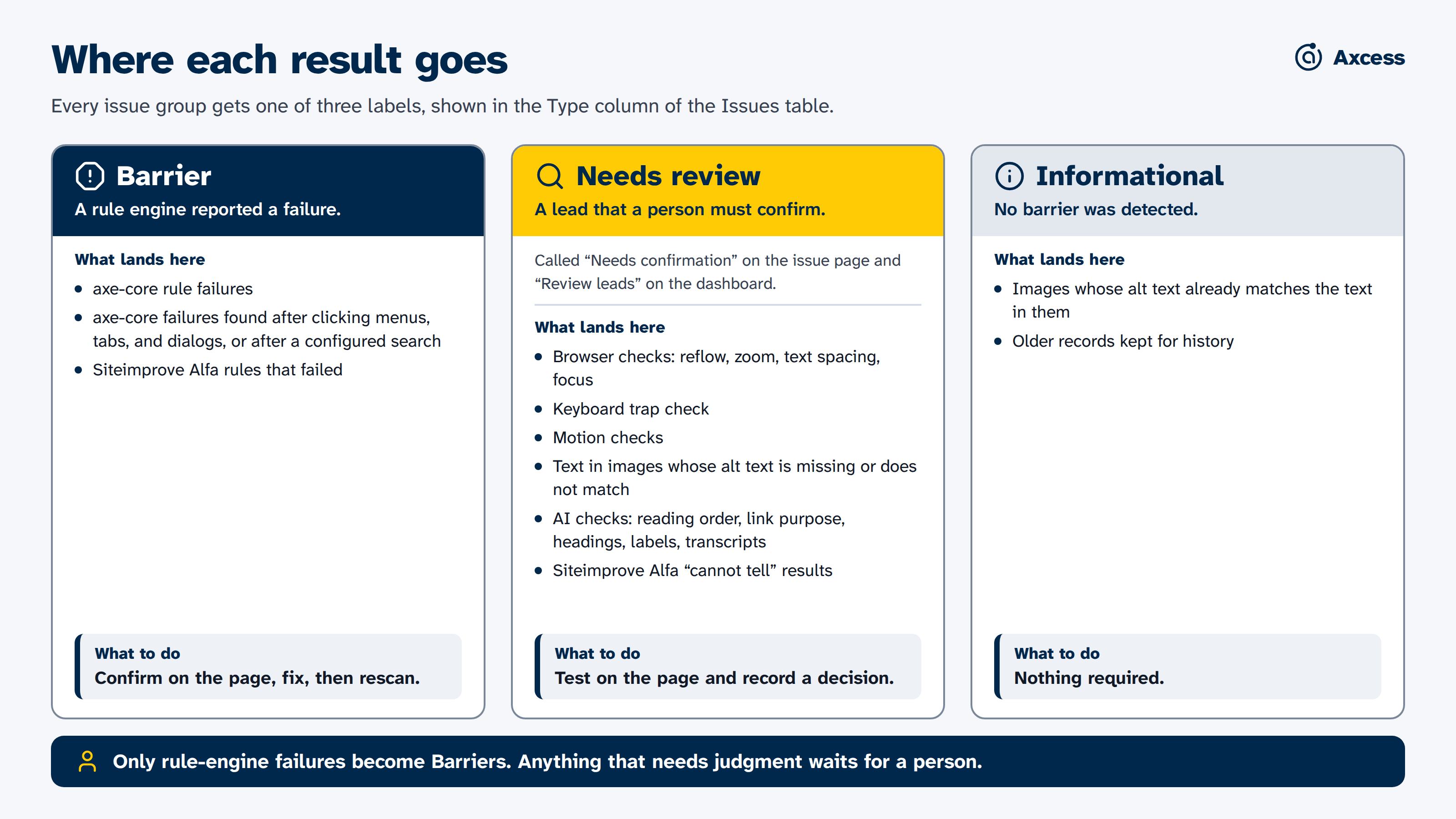
The three report groups and the checks that feed each one. Read more about the report groups.
Triage findings with evidence, pair them with manual testing, and verify fixes on a rescan.
See what to change, where it is, and how you will know it is done.
See how thoroughly a site was checked and what to fix first, without a misleading score.
Review a tool with no cloud dependency, no telemetry, and a documented data boundary.
Evidence, not a verdict. Axcess gives you evidence to review. Its results can't prove WCAG conformance, legal compliance, or that a whole site is accessible, and they don't replace testing with people who use assistive technology.