Site search
Runs the searches you set up and checks the result pages.
Limit: Other search words can reach other pages. You approve these searches, so they can send data to the site.
The Web Content Accessibility Guidelines (WCAG) 2.2 define 55 Level A and AA success criteria. Axcess contributes evidence to 29 of them today. This page shows where each result lands and how Axcess compares with Siteimprove and axe DevTools. It then lists all 55 criteria, with test steps for the 26 that a person must test by hand.
The same checks as the What was checked table in every report.
Runs the searches you set up and checks the result pages.
Limit: Other search words can reach other pages. You approve these searches, so they can send data to the site.
Opens each page in a real browser, so its scripts run and the browser checks can test it.
Limit: Opening a page is not a pass.
Tests each page against the axe-core rules a computer can check, at the WCAG version and level you choose. Failures are Barriers.
Limit: A page with nothing found can still fail WCAG.
Runs Siteimprove Alfa's standard test rules (Accessibility Conformance Testing, ACT). Each rule passes, fails, or cannot tell.
Limit: A failed rule is not proof the page fails WCAG. Each “cannot tell” goes to Needs review.
Reads text in images (OCR) and asks a local vision model whether the alt text says the same.
Limit: A person confirms each result.
A local AI model reads link text, headings, labels, and instructions in context.
Limit: Results go to Needs review. A person confirms each one.
Presses Tab, Shift+Tab, and Escape to find places keyboard focus gets stuck.
Limit: It only looks for traps. Test the rest of keyboard use yourself.
Checks a 320-pixel-wide screen, 200% text, and wider text spacing for cut-off content.
Limit: A person confirms whether cut-off content is a barrier.
Opens menus, tabs, and dialogs, then runs the rule check (axe) on each page state it reveals.
Limit: It skips payments and other risky actions and blocks sending data, so a page state can be incomplete. It may not use every control it finds, and a dialog that would not close stops that page. A person checks custom controls and anything it did not reach.
The group tells you how certain a result is and what to do next. The glossary defines each group.
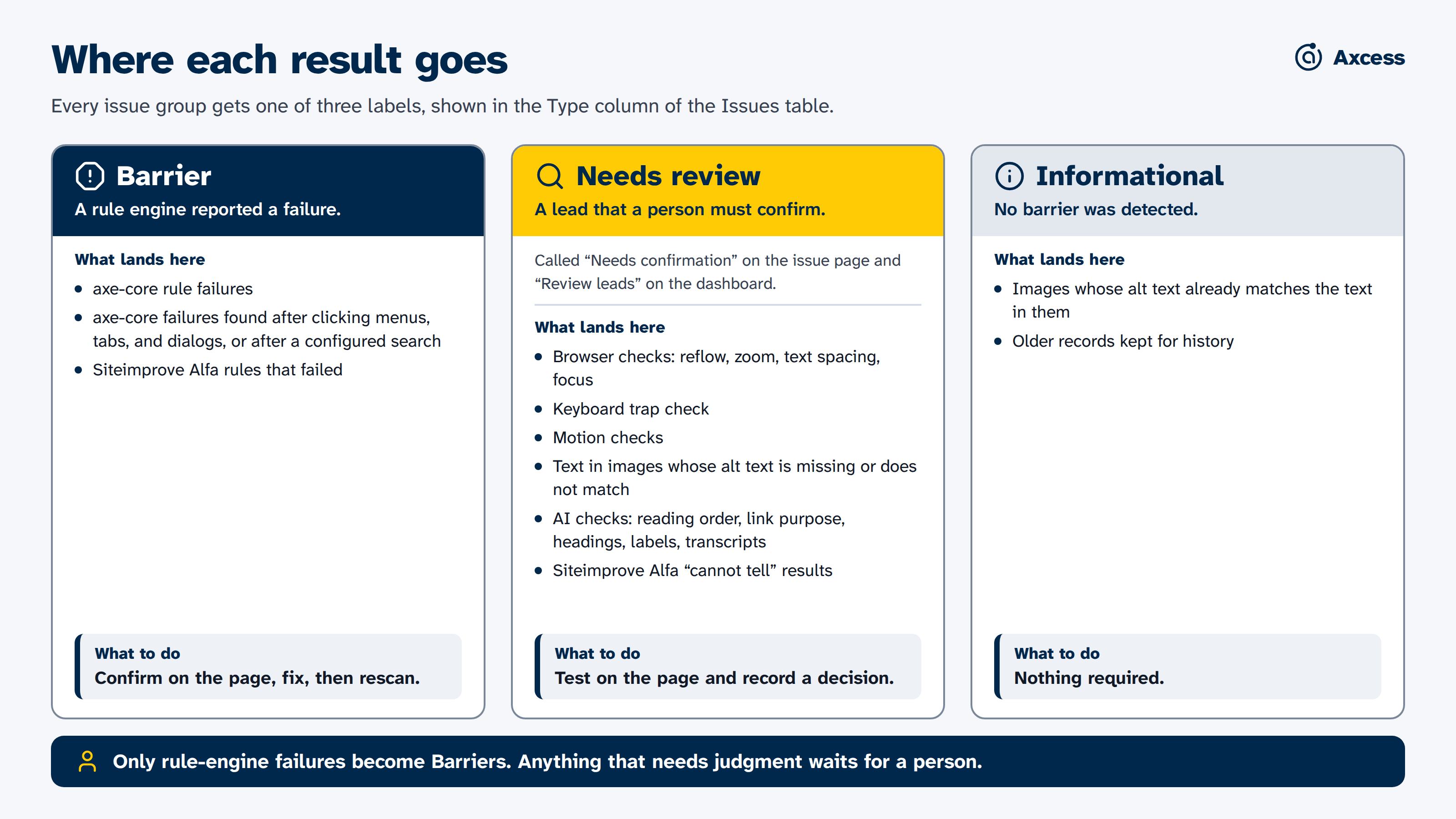
Comes from axe-core rule failures, including problems found after clicking, and from Siteimprove Alfa failures. Confirm it on the page, fix it, then rescan.
Comes from browser checks, the keyboard check, text in images whose alt text is missing or does not match, local AI checks, and Alfa “cannot tell” results. Test it on the page and record your decision.
Comes from image checks where the alt text already matches, and from older records kept for history. No action is needed.
We use and like both. Siteimprove monitors whole sites from the cloud, and the axe DevTools browser extension checks the page in front of you. Axcess fills gaps: pages behind a sign-in, content behind a click, and checks that need a real browser or a person's judgement.
| Check | What it catches | WCAG | Report group | Also caught by Siteimprove? | Also caught by axe DevTools? |
|---|---|---|---|---|---|
| Rule engine (axe-core) | Machine-testable problems on every rendered page, such as missing text alternatives, unlabeled form fields, low text contrast, and ARIA errors. About 90 rules run at Level AA. | Many A and AA criteria, such as 1.1.1, 1.4.3, and 4.1.2 | Barrier | Yes. Siteimprove checks the same kinds of problems with its own rule engine. | Yes. axe DevTools runs these same axe-core rules. |
| Click through menus, tabs, and dialogs | Problems that only appear after a control is used. Axcess operates each safe control, runs axe-core again on what appears, and records which control revealed each problem. | The same criteria as axe-core | Barrier | Not automatically. Its crawler tests each page as it loads. A Dynamic Content Checker add-on lets you capture other states yourself. | Not automatically. axe-core does not test closed menus or dialogs, so you open them and scan again. Paid guided tests help with dialogs. |
| Reflow at phone width | Pages that need sideways scrolling at 320 CSS pixels wide. | 1.4.10 (AA) | Needs review | No automated check found. | No automated check found. |
| Text cut off at 200% zoom | Text that is clipped when the page is enlarged. Axcess approximates 200% zoom with a smaller browser window. | 1.4.4 (AA) | Needs review | Partly. It flags pages that block zooming. It has also documented a “Text is clipped when resized” rule, but its open-source engine deprecated that rule in 2026, so ask Siteimprove whether it still runs. | Partly. axe-core flags pages that block zooming, not clipped text. |
| Text spacing | Text that is clipped after line, letter, word, and paragraph spacing are raised to the WCAG values. | 1.4.12 (AA) | Needs review | Partly. It flags inline styles that lock spacing with !important. No check found that applies the spacing and looks for clipping. | Partly. The same inline-style check. |
| Keyboard traps | Places where Tab and Shift+Tab both fail to move focus away. Reported at most once per page. | 2.1.2 (A) | Needs review | No automated check found. | Only in the paid Keyboard guided test. No axe-core rule. |
| Focus checks | A focused control hidden behind a sticky or fixed header, footer, or banner, and elements that force the tab order with a positive tabindex. | 2.4.11 (AA), 2.4.3 (A) | Needs review | No automated check found. | Partly. axe-core flags positive tabindex as a best practice, and the paid Keyboard guided test reviews tab order. No rule found for focus hidden behind other content. |
| Target size | Buttons and links smaller than 24 by 24 CSS pixels without enough space around them. | 2.5.8 (AA) | Barrier | Yes, when WCAG 2.2 is selected. It also checks the stricter 44 pixel size (2.5.5, AAA), which Axcess checks only when Siteimprove Alfa runs at Level AAA. | Only when WCAG 2.2 rules are turned on. The axe-core rule is off by default, and Axcess turns it on for Level AA scans. |
| Text inside images | Images that contain words, found with OCR and compared with their alt text. An optional local vision model judges what the text is for and maps it to a WCAG criterion. | 1.4.5 (AA), 1.1.1 (A) | Needs review (Informational when the alt text already matches) | No automated images-of-text check found. Its open-source engine has an experimental rule that asks whether an image contains text. An on-demand AI check judges whether alt text matches the image. | No automated check found. A paid guided test reviews image alternatives. |
| Motion and reading order (optional) | Audio or video that plays on its own without controls, marquee text, and, with a local vision model, a visual reading order that differs from the code order. | 1.4.2, 2.2.2, 1.3.2 (A) | Needs review | Partly. Its open-source engine has an autoplaying audio rule that asks a person to confirm how long the audio plays, and a best-practice rule flags blink and marquee. No reading-order check found. | Partly. axe-core covers autoplaying audio (for review), blink, and marquee. No reading-order check found. |
| AI language checks (optional) | Vague link text, headings that do not describe their section, form fields without clear labels or instructions, and audio without a transcript, judged by a local AI model. | 2.4.4 (A), 2.4.6 (AA), 3.3.2 (A), 1.2.1 (A) | Needs review | Partly. It checks that links and fields have names, offers an opt-in AI rule for descriptive headings, and guides a review for transcripts. | Partly. axe-core checks that links and fields have names. Paid guided tests cover link purpose, headings, and labels. |
Axcess scans them after you sign in yourself, including single sign-on and two-factor steps. Siteimprove's help center describes crawling behind a login through a setup done by its support team, and points to an add-on for sites that use multi-factor sign-in. Its free browser extension checks signed-in pages one at a time in your own browser, and so does the axe DevTools extension.
Axcess can also run Siteimprove Alfa, the open-source engine behind Siteimprove's checks, on your computer. Each result keeps the name of the engine that found it, so you can compare them. Results can differ from what the Siteimprove platform reports, which adds its own reviews and settings.
Checked in September 2026 against public Siteimprove and Deque documentation and the open-source axe-core and Alfa code. “No automated check found” means we found none in their documentation, not that none can exist. Tools change quickly, so please open an issue on GitHub if something here is out of date.
These checks still need a person. See Axcess and manual testing.
Use only the keyboard to reach and operate everything, with Tab, Shift+Tab, Enter, Space, the arrow keys, and Escape. Check that focus is always visible and moves in a sensible order. Axcess's keyboard check only looks for traps.
Listen to key pages and tasks with a screen reader such as NVDA, JAWS, or VoiceOver. Check that names, roles, headings, and announcements make sense in context.
Complete real tasks from start to finish, such as applying or registering, including error messages and time limits. Axcess does not submit forms or complete tasks on its own, apart from a search form you configure.
The criteria list below gives the manual steps for every WCAG success criterion. For guides and training, see LSA Accessibility's web accessibility resources and LSA Accessibility training.
These numbers are generated from the coverage file the product itself reads, so they cannot drift from the code.
Axcess checks this reliably on its own. A person confirms it applies and reviews any remaining states.
Axcess catches the mechanical failures. A person tests the parts that need judgement.
A local AI model flags likely problems as leads. A person confirms each one before it counts.
Axcess has no check for this yet. The report gives you the steps to test it yourself.
| Level | Criteria | Automated | Partly automated | AI-assisted | Manual only | With Axcess evidence |
|---|---|---|---|---|---|---|
| Level A | 31 | 2 | 11 | 4 | 14 | 17 |
| Level AA | 24 | 3 | 7 | 2 | 12 | 12 |
| A + AA | 55 | 5 | 18 | 6 | 26 | 29 |
"Contributes evidence" is not "proves conformance". Even a fully automated criterion leaves a residual human judgement, which is why every card below has a What a person still checks section.
Filter by how Axcess covers a criterion or by conformance level, or search by number, name, or keyword. Open any criterion to read what Axcess does and what a person still checks.
Showing all 55 success criteria
Can everyone perceive the content? Text alternatives for images, captions, contrast, zoom, and layouts that reflow on small screens.
axe flags missing alt on img / area / input[type=image] and unlabelled SVGs; the image-of-text VLM separately flags pictures that are really text.
Whether the alt text that IS present is a meaningful equivalent, and the decorative-vs-informative call, needs a human.
For <audio> elements, the semantic LLM checks whether a transcript or text alternative is reachable (nearby "Transcript" link / surrounding text).
Confirm the transcript is accurate and equivalent. Video-only (silent video) can't be detected from the DOM, still a manual check.
No automated check yet. The report includes this criterion in the manual testing list with the steps below.
Play each video and confirm synchronized, accurate captions. Auto-caption diffing (Whisper) is on the roadmap.
No automated check yet. The report includes this criterion in the manual testing list with the steps below.
Confirm an audio description or full text alternative for prerecorded video.
No automated check yet. The report includes this criterion in the manual testing list with the steps below.
Confirm live audio in synchronized media has real-time captions.
No automated check yet. The report includes this criterion in the manual testing list with the steps below.
Confirm prerecorded video has a synchronized audio description track.
axe checks list, table-header, definition-list, required-ARIA-children and heading-structure markup on the rendered DOM.
Relationships conveyed only visually (grouped fields, columns, emphasis that implies meaning) need a human to confirm they're also programmatic.
The visual probe screenshots the page and asks a local vision model whether the visual reading order matches the DOM/source order (CSS can reorder content so screen readers hear a different sequence).
Confirm the model's call by tabbing/reading with a screen reader. Subtle reorderings and content below the fold still need a human, and the probe only runs when a local vision model is available.
No automated check yet. The report includes this criterion in the manual testing list with the steps below.
Read instructions for reliance on shape/size/location/sound alone ("click the round button to the right"), judgement only a human can make.
No automated check yet. The report includes this criterion in the manual testing list with the steps below.
Confirm content isn't locked to portrait or landscape (rotate the device / check for orientation-locking CSS).
axe validates that any autocomplete tokens used are valid.
Confirm autocomplete IS present on fields collecting the user's own info (name, email, address), missing autocomplete isn't auto-detected.
axe flags links distinguished from surrounding text by colour alone (a narrow heuristic).
Most colour-only meaning, form errors, chart series, required-field markers, status, needs a human to confirm a non-colour cue exists.
The visual probe measures actual playback advancement and flags audible audio longer than three seconds when no native or explicitly associated custom control is detected. Autoplay markup alone is not flagged.
Confirm every audible autoplay source can be paused, stopped, or volume controlled independently; test custom controls and browser autoplay policy.
axe measures text/background contrast on the rendered DOM against the 4.5:1 (3:1 large-text) thresholds.
Text baked into images, hover/focus/disabled states, and text over gradients or photos need a human to check.
The responsive probe zooms to a 200% proxy viewport and flags text that clips or overflows its container.
Confirm no loss of content or function across the full zoom range in your target browsers.
OCR + a local vision model judge whether each image is really rendered text rather than a photo/diagram.
Confirm flagged images aren't the allowed exceptions (logos, or text that's essential to a particular presentation).
The responsive probe loads each page at 320 CSS px and flags horizontal scrolling / overflow.
Confirm no content or functionality is lost in the reflowed view (some loss can pass the geometry check but still fail in use).
No automated check yet. The report includes this criterion in the manual testing list with the steps below.
Check that UI component boundaries (inputs, buttons, focus rings) and meaningful graphics meet 3:1. No reliable automated rule exists yet.
The responsive probe injects the WCAG text-spacing override CSS (line-height 1.5, etc.) and flags clipping/overlap.
Confirm no text is cut off or overlapping with the spacing applied.
No automated check yet. The report includes this criterion in the manual testing list with the steps below.
For tooltips/popovers triggered by hover/focus, confirm they're dismissable, hoverable, and persistent.
Can everyone operate the site? Keyboard access, enough time, nothing that flashes, and clear ways to navigate and find things.
axe flags some keyboard-inaccessible patterns; the keyboard probe confirms focus can move through the page.
Confirm every control (menus, custom widgets, drag handles) is fully operable by keyboard, the deepest part of this SC is manual.
The keyboard probe emits a review lead only when the same observable element resists repeated Tab and Shift+Tab exit attempts. It suppresses normal focus wrapping, small focus cycles, modal containment, and opaque iframe or closed-shadow focus.
Reproduce every lead and test components that appear after interaction. Confirm whether arrow keys, Escape, a close control, or a documented non-standard command lets the user leave before recording a failure.
No automated check yet. The report includes this criterion in the manual testing list with the steps below.
If single-character shortcuts exist, confirm they can be turned off, remapped, or are active only on focus.
No automated check yet. The report includes this criterion in the manual testing list with the steps below.
For any time limit, confirm it can be turned off, adjusted, or extended.
The visual probe measures actual playback advancement for visible video longer than five seconds without a detected control. It also records <marquee> as an expert-review lead.
CSS animations, auto-advancing carousels, and auto-updating regions aren't auto-detected, confirm any content that moves >5s can be paused, stopped, or hidden.
No automated check yet. The report includes this criterion in the manual testing list with the steps below.
Confirm nothing flashes more than three times per second. Flash analysis is not implemented.
axe checks for a skip link, landmark regions, and a heading structure that lets users bypass repeated content.
Confirm the skip link actually moves focus and works with the keyboard.
axe checks that every page has a non-empty <title>.
Confirm the title is descriptive and distinguishes the page (a light human check).
The focus probe flags positive tabindex (WCAG failure F44), a manual tab order that overrides the natural DOM order and usually breaks the sequence.
Tab through the whole page and confirm the focus order preserves meaning and operability, the order can break without a positive tabindex (e.g. CSS-reordered columns), which still needs a human.
axe flags empty/unnamed links; the semantic LLM judges whether the link text plus its context conveys where it goes.
Confirm the LLM's borderline calls ("read more", icon links), it flags strong leads, not verdicts.
No automated check yet. The report includes this criterion in the manual testing list with the steps below.
Confirm at least two ways to find pages (nav + search, or sitemap), except for steps in a process.
axe flags empty headings / unlabelled controls; the semantic LLM judges whether each heading actually describes the content it introduces.
Confirm the LLM's borderline heading calls, and check that form-control LABELS are descriptive, label descriptiveness is not yet AI-assisted.
axe has limited checks for suppressed focus indicators.
Tab the whole page and confirm a clearly visible focus indicator on every interactive element, largely manual.
The live-page focus probe focuses each element and flags any whose centre is covered by a position:fixed/sticky overlay (the classic "focus hidden behind the sticky header" failure).
Confirm partial-overlap cases the centre-point check can miss, and tab through interactively, overlays that appear only after a click still need a human.
No automated check yet. The report includes this criterion in the manual testing list with the steps below.
For any multipoint/path gesture (swipe, pinch), confirm a single-pointer alternative exists.
No automated check yet. The report includes this criterion in the manual testing list with the steps below.
Confirm actions fire on the up-event and can be aborted (no critical action on down-press).
axe flags controls whose accessible name doesn't contain the visible label text (label-content-name-mismatch).
Confirm the visible text is fully contained in the accessible name for voice-control users.
No automated check yet. The report includes this criterion in the manual testing list with the steps below.
If a function is triggered by device motion (shake/tilt), confirm a UI alternative and a way to disable motion actuation.
No automated check yet. The report includes this criterion in the manual testing list with the steps below.
For any drag operation (sliders, reorder, kanban), confirm a single-pointer alternative (tap/click) exists.
axe checks interactive targets are at least 24x24 CSS px (with spacing).
Confirm the inline / essential / equivalent-control exceptions are genuinely met for any flagged small targets.
Can everyone understand it? Readable language, predictable behaviour, and forms that help people avoid and fix mistakes.
axe checks <html> has a present and valid lang attribute.
Confirm the declared language actually matches the page's main content.
axe validates lang attributes that are present on parts of the page.
Detecting foreign-language passages that are *missing* a lang attribute needs a human reader.
No automated check yet. The report includes this criterion in the manual testing list with the steps below.
Confirm moving focus to a control doesn't trigger an unexpected context change (auto-submit, new window).
No automated check yet. The report includes this criterion in the manual testing list with the steps below.
Confirm changing a setting (select, checkbox) doesn't auto-trigger a context change without warning.
No automated check yet. The report includes this criterion in the manual testing list with the steps below.
Confirm navigation repeated across pages stays in the same relative order. A cross-page embedding analyzer is on the roadmap.
No automated check yet. The report includes this criterion in the manual testing list with the steps below.
Confirm components with the same function are labelled consistently across pages. A cross-page analyzer is on the roadmap.
No automated check yet. The report includes this criterion in the manual testing list with the steps below.
Confirm help mechanisms (contact, self-help) appear in the same relative order on every page that has them.
No automated check yet. The report includes this criterion in the manual testing list with the steps below.
Submit forms with invalid data and confirm errors are identified in text. Requires interaction the crawler doesn't perform.
axe checks a programmatic label exists; the semantic LLM judges whether each control's label/instructions are sufficient to know what to enter.
Confirm the LLM's sufficiency calls, and test real form submissions, error-time instructions (SC 3.3.x) still need a human.
No automated check yet. The report includes this criterion in the manual testing list with the steps below.
Trigger validation errors and confirm the page suggests how to fix them.
No automated check yet. The report includes this criterion in the manual testing list with the steps below.
For legal/financial/data submissions, confirm reversal, checking, or confirmation is available.
No automated check yet. The report includes this criterion in the manual testing list with the steps below.
In multi-step flows, confirm previously-entered info is auto-populated or selectable rather than re-typed.
No automated check yet. The report includes this criterion in the manual testing list with the steps below.
Manually test each in-scope sign-in and MFA step. Confirm it does not require a cognitive function test (for example, solving a puzzle or memorizing/transcribing information) without an accessible alternative. A successful post-MFA crawl only proves that an auditor established a temporary browser session; it does not automatically evaluate or pass the authentication experience. Do not record passwords, OTPs, passkeys, recovery codes, cookies, or session details in this report.
Does it work with assistive technology? Names, roles, and status messages that screen readers can rely on.
axe checks names/roles/values for standard controls and ARIA widgets (button-name, link-name, aria-* validity, roles).
Custom widgets' state changes (expanded, selected, checked) need a screen reader to confirm they're announced.
axe checks for some live-region / role=status markup.
Confirm dynamic updates (added-to-cart, validation, search counts) are actually announced, needs screen-reader testing.
Criteria the project has designed a check for but not yet shipped. They stay labelled manual until the code exists and has been validated.
Embed each page's nav, cluster; outliers = nav diverges.
Transcribe the audio track, diff vs the published <track>; flag missing / garbage / desynced captions.
Find visually similar components across pages; verify their accessible names match.
Locate help affordances across the crawl; flag pages where help moves to a non-standard location.
Roadmap and coverage are reconciled against the code in the coverage tracker.