Privacy and trust

Your evidence never leaves your computer

Local-first is not a slogan here. It is the reason Axcess exists: accessibility audits often involve private, sensitive, or login-protected pages, and those should not be uploaded to anyone's cloud.
The boundary

What stays local and what connects out

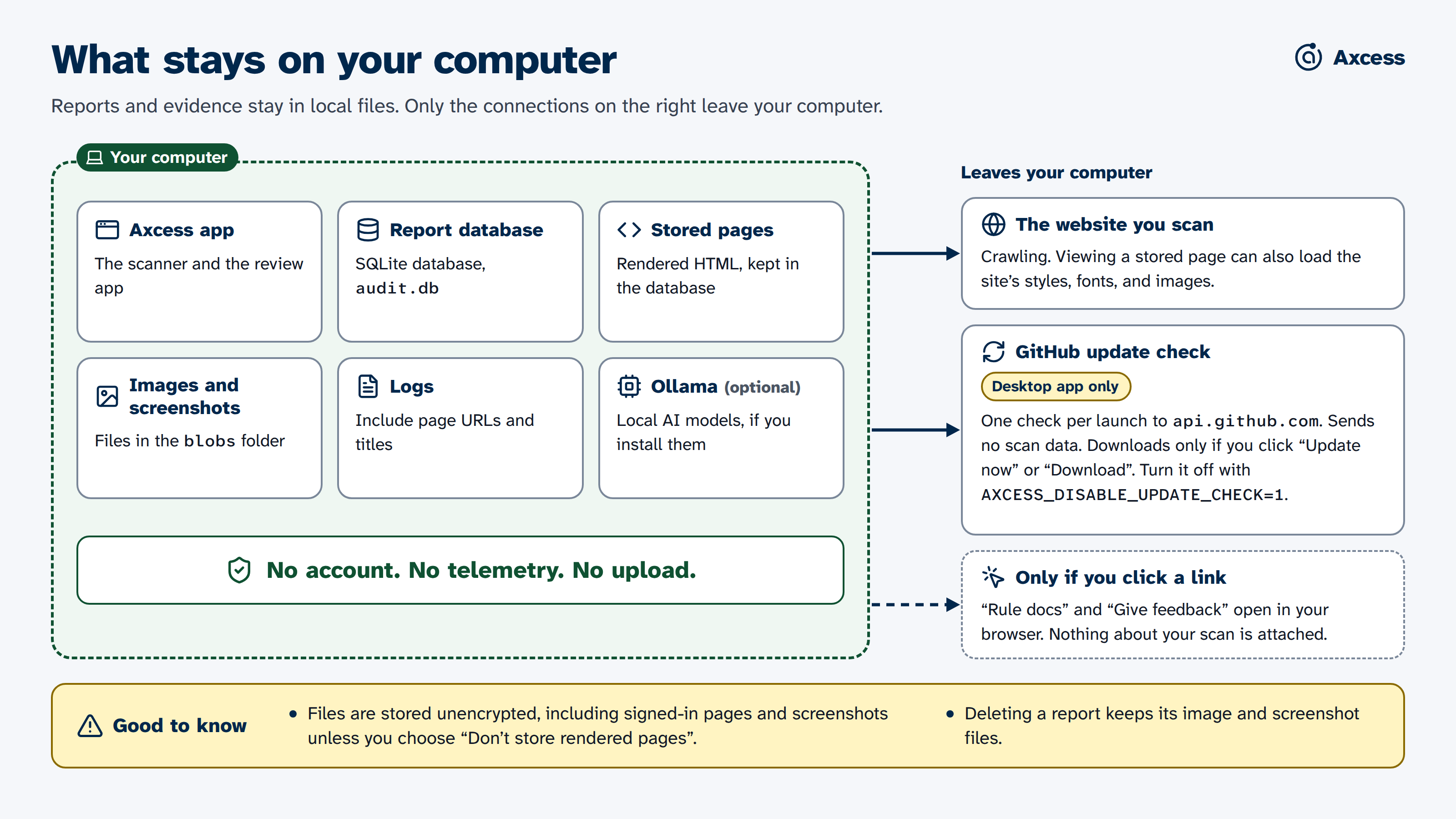
Diagram of what stays on your computer. Reports, stored pages, screenshots, images, and logs stay in local files, and optional Ollama runs locally. Axcess connects to the website you scan and, in the desktop app, to GitHub once per launch to check for updates. Links such as "Rule docs" and "Give feedback" open in your browser only when you click them. It has no account, telemetry, or upload. Files are not encrypted, and deleting a report keeps its image and screenshot files.
Stays on your computer
Scan evidencePages, elements, snippets, screenshots, and image files, stored in a local database.
Your decisionsEvery review outcome, rationale, and status change, with its history.
Reports and exportsWorkbooks, reports, and ticket files are written to your disk and go only where you send them.
The browserChromium renders pages locally, including the visible window you sign in with. The desktop app includes it.
Text recognitionOCR reads text inside images on your machine. The desktop app includes it; a source install needs Tesseract installed separately.
Optional AIIf you choose to install a local model through Ollama, it runs on this computer too.
Connects out
Connects to: the website you are scanningAxcess loads pages from the target site at the rate you set. Public scans respect robots.txt unless you say otherwise; login scans do not check it. Viewing a stored page later can also load that site's styles, fonts, and images.
Connects to: GitHub, for desktop updatesOnce per launch, the desktop app asks GitHub whether a newer version exists. That request carries no scan data, and setting AXCESS_DISABLE_UPDATE_CHECK=1 turns it off.
Connects to: nothing elseNo telemetry, no usage analytics, no cloud AI. The Give feedback button opens a form in your browser only when you choose to click it, and carries nothing about your scan. Any other external integration would require an explicit administrator decision.
Protected sites

Scanning behind a login without sharing your password

Many of the pages that matter most are behind a sign-in. Axcess handles this the safe way: you sign in, and it scans with that session.
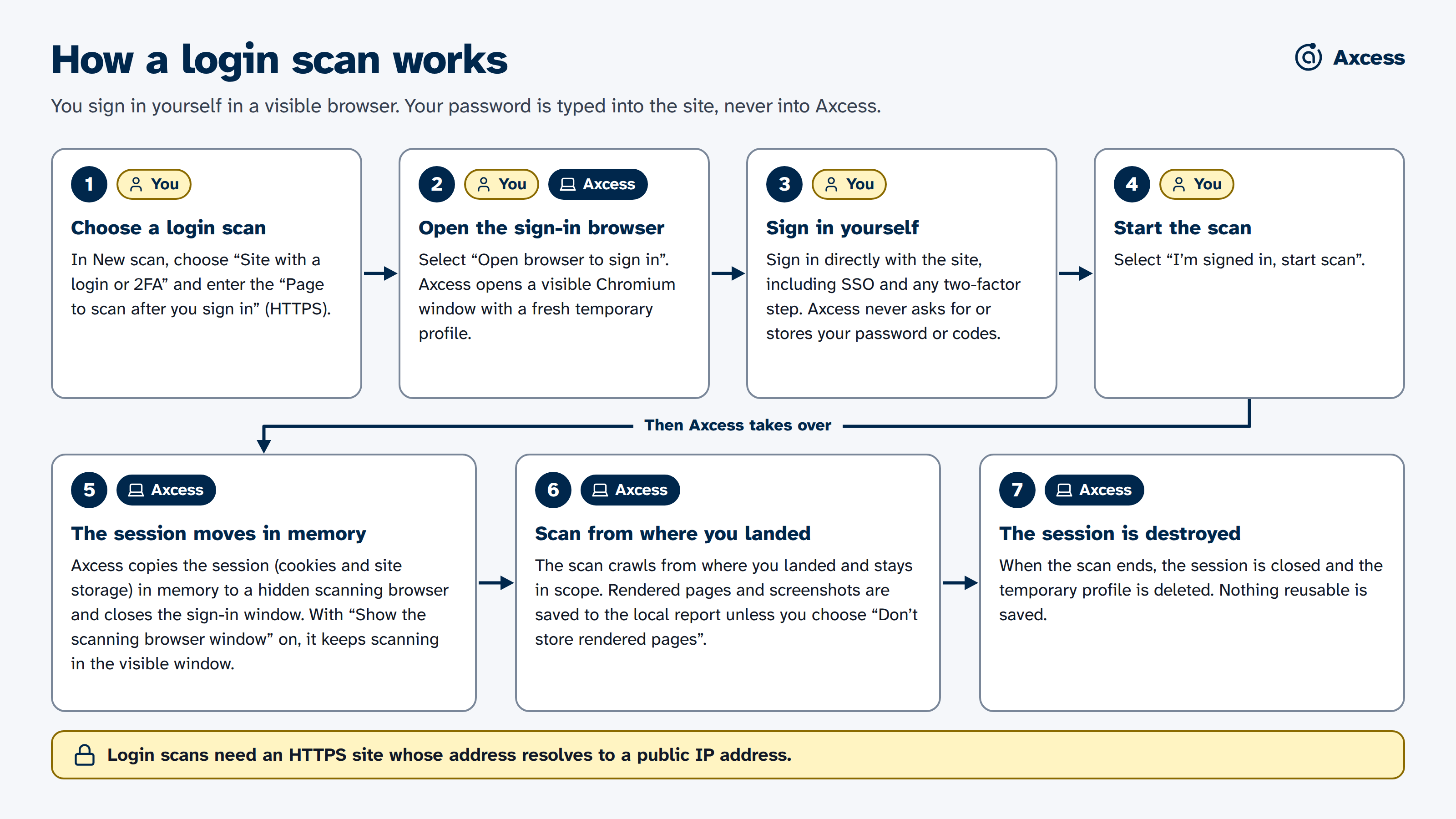
Diagram of a login scan. You choose "Site with a login or 2FA", Axcess opens a visible browser, you sign in directly with the site including any two-factor step, then select "I'm signed in, start scan". Axcess moves the session in memory to its scanning browser, crawls from where you landed, and deletes the temporary browser profile when the scan ends. Login scans need an HTTPS site whose address resolves to a public IP address.
  • The sign-in window is a normal Chromium window with a fresh temporary profile.
  • You type your password, passkey, or one-time code into the website, never into Axcess.
  • The session stays in memory and ends with the scan, and the temporary profile is deleted. Rendered pages and screenshots of what you signed in to are saved in the local report unless you choose Don’t keep a saved copy of each page.

Step by step: scan a site behind a sign-in.

You stay in control of sign-in. Axcess only continues after you sign in yourself, so use accounts and sites you have permission to test.

Optional AI

AI is opt-in, local, and labelled

You install it, or you don't

AI-assisted checks need a separately installed local service called Ollama and models you download yourself. Axcess never installs or downloads them silently, and it works without them.

Every AI result is marked

Model output is shown as a lead that needs confirmation, with the model's rationale beside the original evidence. It cannot become a confirmed barrier without a person.

Where your data lives

Plain folders you control

The desktop app keeps evidence in the operating system's application-data folder, never inside the app itself. Delete the folder and the evidence is gone.

Data locations by operating system
Operating systemData folder
macOS~/Library/Application Support/Axcess/data/
Windows%APPDATA%/Axcess/data/
Linux~/.config/Axcess/data/

Inside: a single SQLite database that is the source of truth, a blobs folder of images and screenshots, and local logs. Logs include the addresses and titles of the pages scanned. Deleting a report keeps its image and screenshot files. Exported files are snapshots, not the record.

Teams and institutions

Sharing without giving up local-first

Small team on a private network

Axcess can run on an always-on machine for a trusted team, over a LAN or a private mesh such as Tailscale, behind a shared access token. It must never be exposed as an open public service; anyone with access can point a crawler at any site.

Managed protected scans

For sensitive university systems, there is a stricter setup that IT runs. People reach it only through an approved university sign-in, evidence is encrypted and deleted after seven days, and exports are controlled. It needs institutional infrastructure and is off by default.

Accuracy

What Axcess claims about its own accuracy

A guardrail, not a marketing number

We keep a fixed set of made-up examples, each labelled with the right answer, and score recorded results against it. For every kind of check, fewer than 5% of the results it reports may be wrong, and it must find at least 80% of the real problems in the set. Because the examples are made up, this protects the rules for what counts as a Barrier; it does not measure accuracy on real sites.

What that does not mean

It is not a claim that every real website will see the same rate. A real-world accuracy figure would need a fresh, representative sample of real pages, checked independently by at least two accessibility experts. The project says so in writing.